Bottom Navigation
The bottom navigation bar is present across all main screens of the app. It gives you quick access to every NOTRACKRUN feature.
The four sections
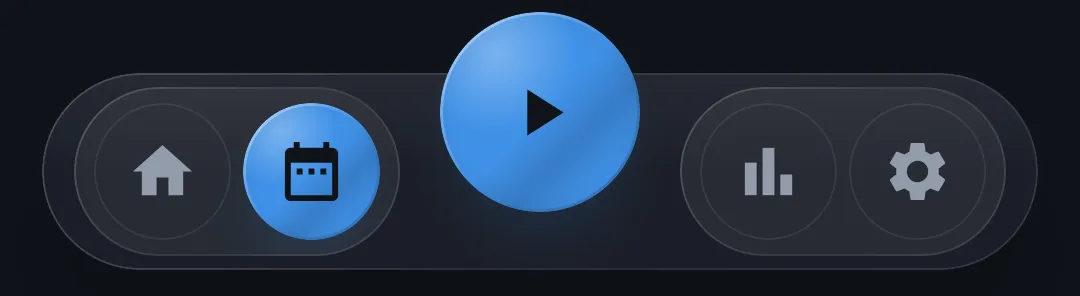
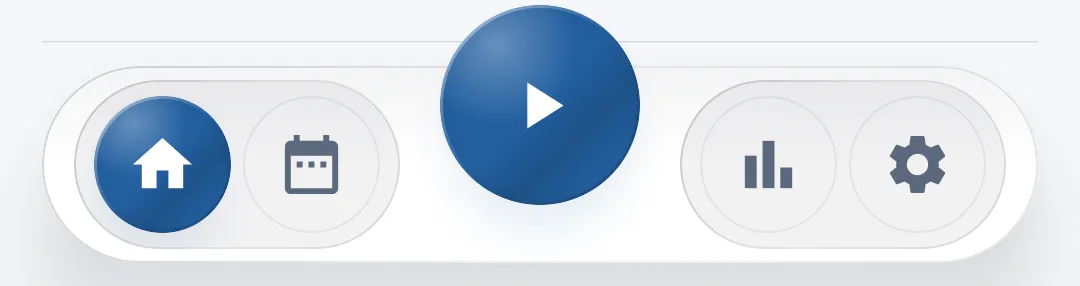
The navigation bar has four icons, split on either side of the central button:
| Icon | Section | Description |
|---|---|---|
| House | Home | The home screen / dashboard |
| Calendar | Calendar | The training plan schedule |
| Chart | History | Your run history |
| Shield | Settings | The app's settings |
The active tab is highlighted with a colored background around its icon.
The Play button — start a run
At the center of the bar, a prominent circular button lets you start a new run in a single tap, from any screen in the app. This is NOTRACKRUN's primary action, deliberately made accessible everywhere.
Tapping it opens the classic run screen in full-screen, ready to start your run.
Contextual display
The navigation bar hides automatically as you navigate deeper into a section — for example when viewing a run's detail in History, or when creating a custom goal. It reappears as soon as you return to the section's main screen.
First launch — onboarding tutorial
The very first time you open the app, a short welcome tutorial automatically appears to introduce the main features. You can swipe between slides and finish by tapping Get Started. This tutorial won't be shown again on subsequent launches.